

Content creators require strong, precise, and portable tools. A decent tablet can do sketching, video editing, 3D modeling, and image retouching. Not all tablets encourage creativity. Choosing the right one necessitates examining crucial features that influence output quality and efficiency. Everything matters, from stylus performance to screen accuracy to hardware. Knowing what to look for ensures that your tablet keeps up with your skills as a digital artist, video editor, or designer. This article focuses on the most important tablet specifications for creatives that want smooth workflows and clear, consistent output.
Display and Stylus Specs You Should Never Compromise On
Screen Size, Resolution, and Aspect Ratio Basics
The display is your canvas; size matters. Larger displays (11-13 inches) allow more workspace without requiring constant zooming. 2560 x 1600 or higher resolution ensures crisp photographs and accurate editing. Sharp displays show microscopic details. Drawing and picture editing appear more natural in a 3:2 or 4:3 aspect ratio than in the cinematic 16:9. For sketching or storyboarding, the screen size should allow for natural hand gestures. Size, clarity, and proportion provide a natural and productive display environment for creatives.
Color Accuracy, Brightness, and Refresh Rate Essentials
Color fidelity determines how your product appears on different monitors and in print. Tablets with 100% sRGB or DCI-P3 coverage display colors that are true to life. Brightness is essential—at least 500 nits are ideal for working outside or under studio lights. Drawing and video playback seem smoother at 120Hz, which enables precise pen tracking. These principles result in a screen that is both visually appealing and functional. If you value looks, go above average. Quality color, brightness, and refresh rate make a huge impact on creativity.
Stylus Feel: Pressure, Tilt, Latency, and Palm Rejection
Stylus experience influences drawing, writing, and design ease. Select pens with over 4,000 pressure sensitivity levels for improved sketching and shading. Tilt-supported realistic brush effects assist illustrators and calligraphers alike. Low latency provides strokes with a pencil-like feel and instantaneity. Palm rejection eliminates unintended input when you place your hand on the screen, which increases efficiency. These qualities simulate real-world drawing tools while reducing fatigue. Styluses are great creative tools. Tablets with pro-level pen support allow for natural, precise, and uninterrupted creativity.
What Performance and Storage Do Creators Really Need?
Processor and Graphics Power for Creative Apps
To function properly, creative programs like design, video editing, and animation require a high level of computing power. A tablet with a powerful CPU and sophisticated graphics system can handle demanding jobs like editing 4K films, generating layered images, and displaying complicated animations without latency. Powerful hardware allows for speedier workflows, smoother transitions, and fewer crashes during demanding tasks. For those seeking professional-level creativity, investing in a tablet with a strong CPU and GPU speed is critical. Choosing a device with strong processing power enables creators to work more effectively and bring their ideas to life with ease.
RAM and Multitasking for Smooth Workflows
Working with large files and many programs is usual in creative projects. So begin with 8GB of RAM, followed by 16GB for intense tasks such as video editing or 3D modeling. More RAM enables faster tool switching, complex file management, and multitasking. Split-screen or floating-window tablets require adequate RAM to function properly. Programs that do not have enough RAM may halt or crash when under stress. Creatives working on tight deadlines cannot afford delays. If you utilize a tablet that allows for intensive multitasking, your creative flow will remain uninterrupted.
Storage Capacity, Speed, and Backup Options
Creative assets, such as RAW photographs and video recordings, quickly devour space. Begin with at least 256GB of internal storage, or upgrade if you deal with 4K footage or layered PSD files. Tablets with UFS 3.1 or NVMe SSDs provide quicker file access, resulting in faster opening, saving, and exporting. If your tablet lacks additional storage, make sure cloud backup integration is seamless and safe. Many makers also use external SSDs using USB-C to share and archive creations. Fast, dependable storage eliminates bottlenecks and allows you to focus on the creative process. When every second matters, having enough capacity and speed protects your information and streamlines your process.
Which Practical Specs Make a Tablet Creator-Friendly?
Battery Life, Charging Speed, and Heat Control
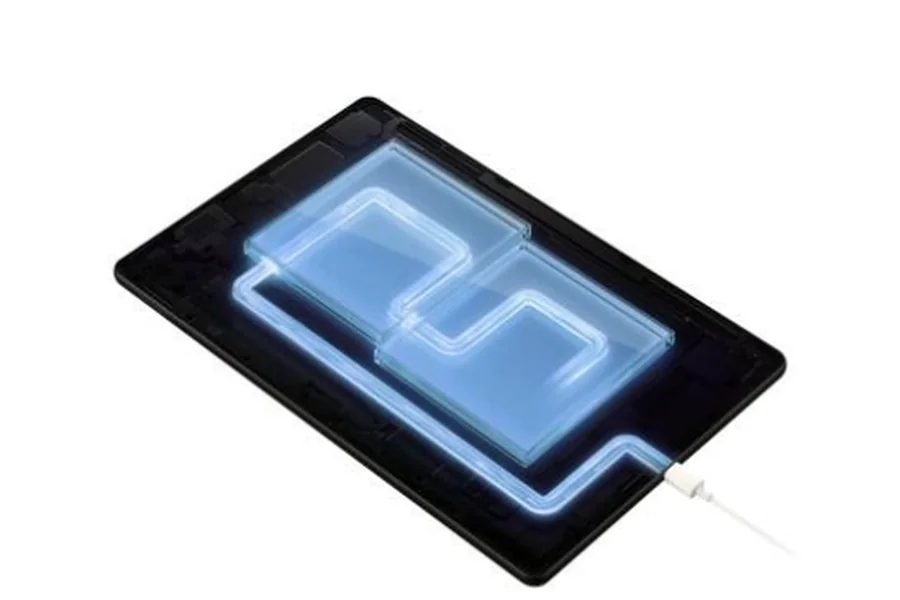
Creators frequently work without power; thus, tablets with 10+ hours of real-world battery life are essential. Choose tablets with 30W USB-C charging to get back online quickly. Thermal management is critical, especially for demanding workloads such as video processing or high-resolution drawing. Overheating lowers performance and component life. Passive or smart thermal tablets are both quiet and cool. Battery and heat management have an impact on both productivity and comfort. Choose a tablet with long battery life, rapid charging, and decent temperature management if you want to stay creative without sacrificing performance.
Ports and Connectivity: USB-C, Display Out, Wireless
Creators want connectivity for workflow, not for ease. It is necessary to have a USB-C connector for rapid data transfer, external displays, and power delivery. Display output links to monitors or projectors, allowing for presentations, dual-screen editing, and color grading. Wi-Fi 6 and Bluetooth 5.2 provide fast and dependable connectivity across keyboards, styluses, and file transfer apps. Some tablets support 5G or LTE for mobile cloud processing. Multiple solutions remove bottlenecks and accommodate any arrangement, whether mobile or in-studio. Connectivity that allows you to connect, sync, and control is vital.
Build Audio, Cameras, and Accessory Support
A creator’s tablet should be strong. For daily travel and use, choose between aluminum and premium composite variants. Stereo speakers with increased bass are useful for audio editing and video screening. Quality front and rear cameras allow for content creation, video conversations, and reference photography. The inclusion of external keyboards, adjustable stands, and precise styluses boosts tablet adaptability. Magnetic attachments, keyboard docks, and wireless charging boost everyday usage. Your creative space is both portable and powerful, thanks to a durable tablet that supports key attachments and provides immersive audio. The right design details boost comfort, quality, and future productivity.
Conclusion
Content production requires more of a tablet than casual use ever will. From screen quality to stylus responsiveness, every feature has an impact on your workflow. Processing power, memory, and rapid storage allow your thoughts to flow uninterrupted. Features such as dependable connection, long battery life, and accessory compatibility transform a portable screen into a comprehensive creative studio. If you’re considering a Huawei device, be sure to account for the huawei google play store problem, which may affect access to key creative apps. Don’t get distracted by sleek marketing—focus on the specs that directly affect your daily work. Whether you’re an illustrator, editor, or designer, choosing a tablet with the right specs ensures your tools keep up with your vision.