
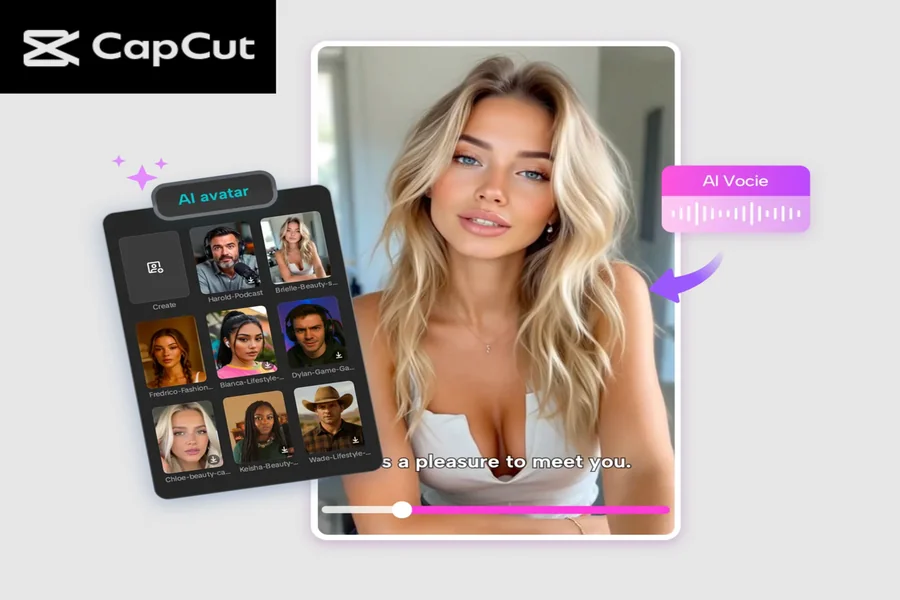
Digital storytelling is becoming one of the most powerful ways to share ideas, entertain viewers, and build an online presence. Whether you’re a creator, a student, a business owner, or someone who simply enjoys telling stories, the CapCut AI Avatar feature opens the door to a fun, fast, and modern way of bringing characters to life.
Instead of recording yourself on camera or hiring a voice actor, you can now create a fully animated avatar that speaks, gestures, and performs exactly the way you want. With thousands of customizable characters and over a hundred AI voices, CapCut makes storytelling more accessible than ever before. If you want to create engaging story videos—whether they’re inspirational tales, educational explainers, product stories, or fun short films—this tool gives you everything you need. Let’s explore how you can use CapCut AI Avatar to transform your ideas into meaningful digital stories.
Why CapCut AI Avatar Is Perfect for Digital Storytelling
Before we jump into the steps, it’s helpful to understand why this feature is becoming so popular among creators.
-
No Camera Needed
Don’t like recording yourself? No problem. Your avatar becomes your digital actor—no makeup, perfect lighting, or retakes required.
-
Endless Character Options
CapCut provides over 1,000 unique avatars ranging from professional characters to fantasy heroes, cute mascots, animated presenters, and more. You can perfectly match your story’s personality.
-
Natural AI Voices
With the Text to Speech AI feature and 150+ AI-powered voices, you get clear, expressive narration for your video—no need to record audio yourself.
-
Faster Production
Digital stories can now be made in minutes. Just type a script, pick a character, and the avatar takes care of the rest.
-
Great for All Platforms
Whether you post on YouTube, TikTok, Instagram, or use the video for presentations, CapCut makes exporting easy and high-quality. Now, let’s walk through how to create your own story using CapCut’s AI avatar feature.
How to Use CapCut AI Avatar Feature for Digital Storytelling
Step 1: Access the AI avatar
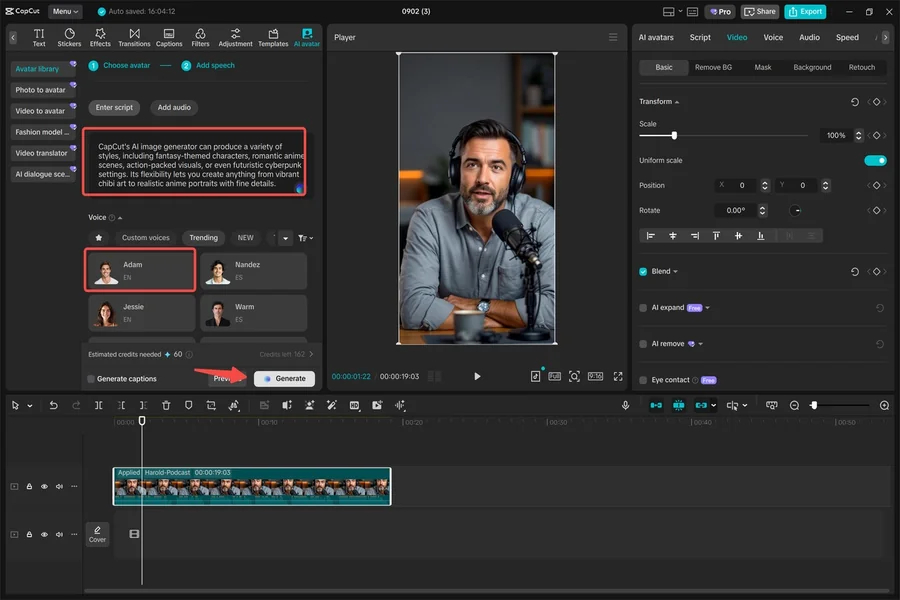
Open CapCut on your computer and head to “AI Avatar” > “Avatar Library.” Here you’ll see a massive selection of characters—from 3D animated heroes to professional presenters and playful cartoon styles. Browse through the library and pick the avatar that best fits your story’s theme. If you’re telling an emotional story, choose a warm and friendly character. For educational content, choose a clean, professional look. For fun, imaginative stories, go bold with fantasy or gaming characters.

After choosing your avatar, click “Add Speech.” This is where the magic happens. CapCut lets you choose from 150+ AI voices, including male, female, robotic, youthful, dramatic, and regional styles. You can type your script directly into the text box or paste it if you’ve written it beforehand. Once you’re satisfied with the script and voice selection, simply hit “Generate.” CapCut will instantly animate your avatar, syncing the mouth movements, facial expressions, and gestures with your chosen voice. This step alone removes hours of recording or acting work.
Step 2: Edit your avatar video
Your avatar is now alive, but a great digital story needs a bit more polish to be visually appealing. Start with Filters. Experiment with different color tones or cinematic looks to match your story’s vibe. For example:
-
Warm filters work great for emotional stories
-
Cool tones fit futuristic or tech stories
-
Vibrant colors are perfect for fun social media content
You can also change the background to completely alter the setting. Whether you want your avatar standing in a classroom, a futuristic city, a cozy room, or a fantasy world, CapCut gives you endless options. You can upload your own background or select one from CapCut’s built-in library.
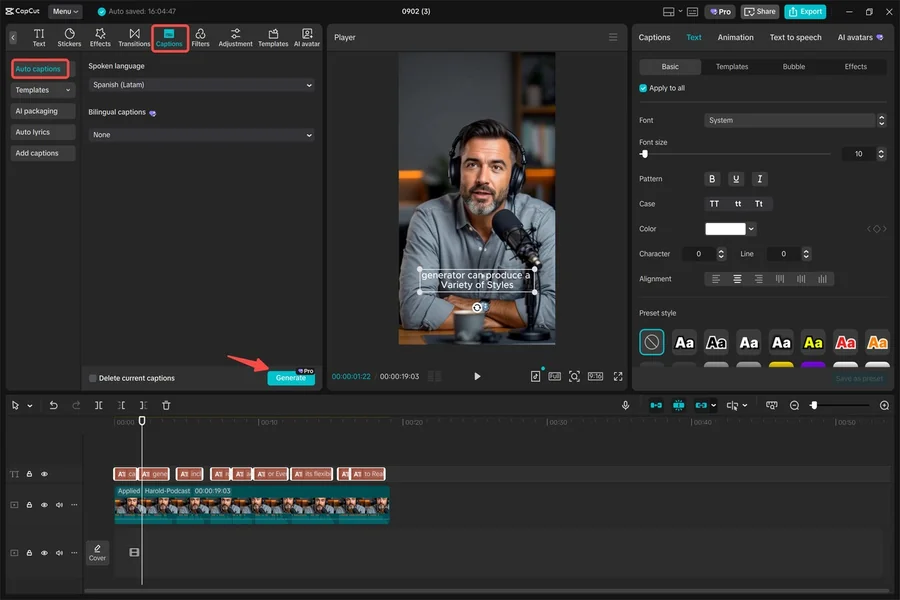
Next, improve your video’s accessibility and professionalism by adding subtitles. Go to “Captions” > “Auto captions.” CapCut will automatically generate subtitles based on your avatar’s speech. Not only does this make your content more inclusive, but it also increases watch time on platforms where viewers watch without sound. For storytelling videos, captions help emphasize emotions, key lines, and important details. Once you’re done adjusting the filters, background, and subtitles, play back your avatar video and make sure everything flows smoothly. This is where you can trim clips, adjust pacing, or add sound effects and music to further enrich your story.
Step 3: Export your avatar
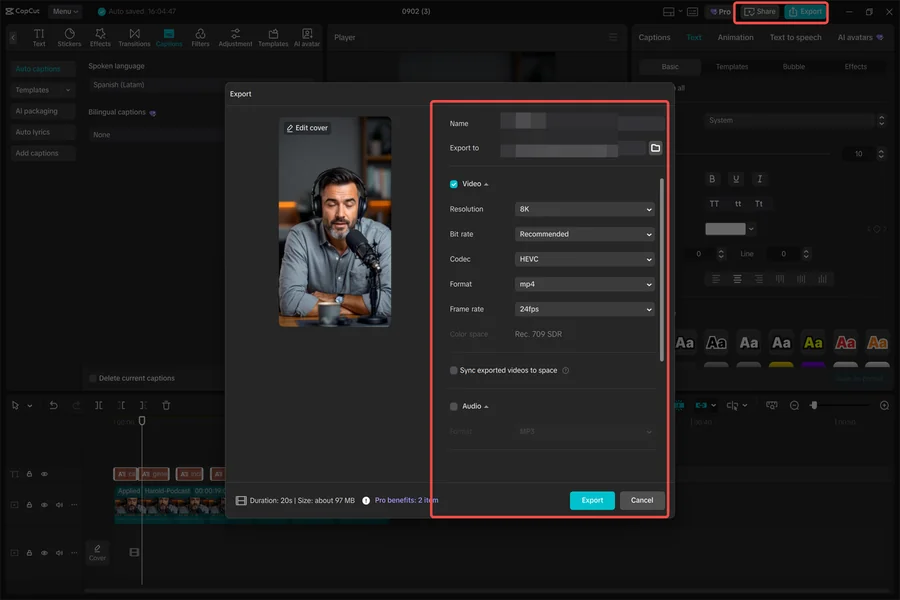
When your digital story looks perfect, it’s time to export your masterpiece. CapCut lets you save the finished video directly to your device in high resolution. If you want to publish right away, you can also export directly to platforms like TikTok or YouTube. This saves you time and keeps your content workflow smooth and simple.
Once your video is uploaded, share it proudly with your audience. Digital stories created with AI avatars stand out for their modern, unique, and incredibly polished look. Whether it’s a motivational message, a fictional short, a product walkthrough, or a personal narrative, your audience will enjoy the clean visuals and expressive avatar performance.
Conclusion
CapCut’s AI Avatar feature is more than just a cool editing tool—it’s a creative shortcut that lets anyone become a storyteller without cameras, studios, or advanced animation skills. In just a few steps, you can transform a simple idea or script into a visually striking story driven by a customizable digital character. As the world of content creation continues to evolve, tools like CapCut help creators experiment, express themselves, and deliver engaging videos that stand out online. With thousands of avatars and AI voices to choose from, there’s no limit to the type of stories you can tell.