

Since this was released in the media, HUAWEI has made sure that its loyal consumers will always have a way of to have a gmail app download for huawei mobile devices. With that said, here are the ways that HUAWEI overcomes the Gmail app restrictions on its phones and tablets.
Methods to Undertake for HUAWEI Users to Have a Gmail App
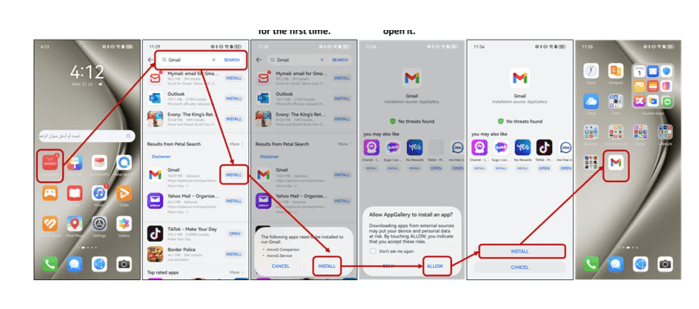
Download through the AppGallery
HUAWEI guarantees the gmail app download for huawei through the AppGallery. Restrictions with the use of Google apps and services are experienced only because of the inability to access the Google Play store. But with the native HUAWEI AppGallery, you can download and install the Gmail apps flawlessly with the help of microG or Gbox, depending mainly on the year that your device was released. To do this, you just need to download the Gmail app through the AppGallery, make the necessary installations, and you are good to go. When you see the Gmail app on your home screen, you can set it up according to your preferences.
Integration in the Email App
The next method that you can use to gain access to your Gmail account is to integrate it using your native Email app that can be found on your HUAWEI device. Go to the Email app right now and look for the Gmail account option. You will need to input your email address as well as your password. You will also be prompted to authorize the Email app to access your Gmail account so that you can read, send, and edit your emails through the Email app itself. The Email app is actually a platform where you can access not just the Gmail account but all other email accounts as well. In this way, you have a whole email management system to control all the incoming and outgoing emails right in the palm of your hands.
Web browser access
The last option that you have to overcome the restrictions of Google for the use of its apps and services is to access your Gmail using a local web browser. Any search engine or web browser has no restrictions whatsoever. You can go to any link, website, or email platform using a web browser that is installed on your HUAWEI device. You can go to the Gmail website by doing a quick search of it online. When you are on the Gmail login home screen, you just have to put in your email and password to have access to your account. When you are inside the Gmail interface, you can make the changes that you need, write the emails that you have to send, and read the messages that you receive.
Conclusion
The three methods of overcoming Google’s restriction on HUAWEI over the use of its apps and services have long been proven to work and function seamlessly with the device. You can choose to use the gmail app download for huawei by installing it through a simple AppGallery search. The next method is to integrate your Gmail account to the native HUAWEI app available on all devices. The last step is to use any type of web browser to gain access to your Gmail account by logging into it using your contact details. You can maximize the benefits and advantages of using HUAWEI smartphones while having access to all Google apps and services.